
5 Tips for Choosing Professional Headshot Backgrounds
Your headshot is often the first impression you make online, and the background you choose can either elevate or detract from your professional image. Here’s a quick guide to getting it right:
- Neutral Colors Work Best: Use white, gray, or black for a clean, polished look. These colors suit most industries and ensure the focus stays on you.
- Prioritize Contrast: Pair light clothing with dark backgrounds and vice versa to avoid blending in.
- Match Your Industry: Formal settings suit corporate roles, while creative professions can opt for bolder or textured backdrops.
- Keep It Simple: Avoid cluttered or busy backgrounds that distract from your face.
- Mind the Lighting: Ensure proper lighting to highlight your features without casting harsh shadows.
A well-chosen background ensures your headshot looks professional across platforms like LinkedIn, company sites, and resumes. Neutral tones, clear contrast, and good lighting are key to creating a polished image that aligns with your personal brand.
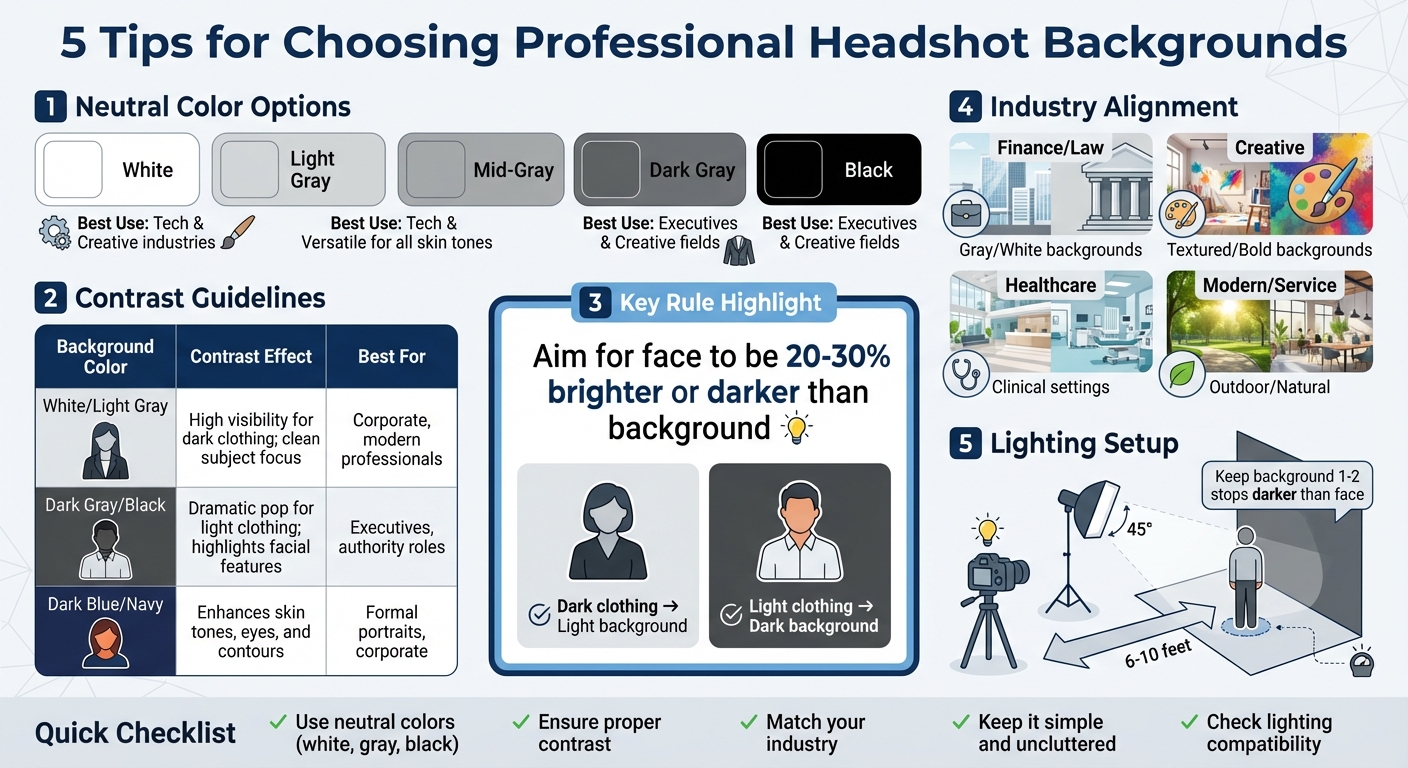
Professional Headshot Background Guide: Colors, Contrast Effects, and Industry Best Practices
1. Use Neutral Colors for a Professional Look
Choosing the Right Neutral Background
Neutral backgrounds - like white, light gray, mid-gray, dark gray, and black - offer a clean, polished look for professional headshots in the U.S., whether for digital or print use. White and light gray are ideal for tech and creative industries, projecting a fresh and modern vibe. Mid-to-dark grays are incredibly versatile, complementing a variety of skin tones and clothing colors. Black, on the other hand, delivers a bold and formal appearance, often favored by senior executives or those in creative fields.
These options align with the conservative norms of corporate settings, ensuring your headshot looks professional and keeps the focus on you. If you want to add a subtle warmth without losing that polished feel, consider muted tones like beige, taupe, or soft pastels. These hues strike a balance between being inviting and maintaining a professional edge.
Ensuring Contrast and Clarity
While neutral backgrounds are a solid choice, pairing them with the right outfit is key to standing out. Contrast is crucial - dark clothing works best with light backgrounds, while lighter or mid-tone outfits shine against darker settings. For example, if you're using a dark gray or black background, opt for colors like light blue or soft gray to create a clear visual distinction and avoid the dreaded "floating head" effect. Neutral backgrounds also help maintain natural skin tones by eliminating color casts, ensuring the photo looks authentic and flattering.
Aligning with Your Industry and Personal Brand
Your choice of background should also reflect your professional identity and align with your industry. In more traditional fields, gray or white conveys reliability and professionalism, fitting seamlessly with U.S. corporate aesthetics. For creative or bold personal brands, a deep black or charcoal background can make a striking statement, exuding sophistication and confidence.
However, it’s important to avoid mismatched choices. For instance, a dark background might feel too intense for a family physician, while a stark white background could clash with the warm, earthy tones of a wellness coach’s brand. To find the perfect neutral tone, review your website and social media profiles to ensure consistency. Tools like PhotoGuru AI can help you experiment with different neutral backgrounds to find the one that best fits your brand.
2. Create Clear Contrast Between Subject and Background
Contrast and Subject Visibility
A neutral background is a great starting point, but creating enough contrast between you and the backdrop is what truly makes your features stand out. For a balanced look, aim for your face to be 20–30% brighter or darker than the background. This contrast ensures your features remain distinct. A simple rule of thumb? Pair dark clothing with lighter backdrops and light clothing with darker ones. For instance, a corporate lawyer opted for a deep navy blue background in January 2024, resulting in a headshot that exuded both trust and authority. On the flip side, low-contrast combinations - like a navy suit against a dark background - can make your features blend into the scene, reducing visibility.
Once you've tackled the clothing and background pairing, the next step is refining your lighting.
Lighting and Technical Compatibility
Your lighting setup plays a key role in creating that sharp, professional look. Make sure the lighting highlights you more than the background. This not only enhances edge definition but also adds depth to your headshot. If you're working with darker backdrops like black or charcoal, consistent fill lighting is essential to prevent shadows from making your features disappear into the background. A helpful tip is to preview your headshot in black-and-white - if your face doesn’t pop, it’s time to tweak the lighting or background.
Your skin tone also matters when choosing a background. Fair skin tones tend to look best against medium to dark shades like navy or gray, which naturally create separation. On the other hand, lighter, neutral backgrounds often complement darker skin tones beautifully.
These strategies for managing lighting and background ensure your headshot stands out and leaves a lasting impression. Tools like PhotoGuru AI make it easy to test different background options, helping you find the perfect combination for your complexion and wardrobe - all without the hassle of multiple photo sessions.
| Background Color | Contrast Effect | Best For |
|---|---|---|
| White/Light Gray | High visibility for dark clothing; clean subject focus | Corporate, modern professionals |
| Dark Gray/Black | Dramatic pop for light clothing; highlights facial features | Executives, authority roles |
| Dark Blue/Navy | Enhances skin tones, eyes, and contours | Formal portraits, corporate |
3. Align Background with Your Industry and Brand
Industry and Branding Alignment
The background of your headshot should complement your profession and align with your brand identity. For industries like finance or law, a clean and formal backdrop works best. It keeps the focus on you while signaling professionalism and dependability - qualities these fields prioritize.
If you're in a creative field, you have more room to play. Textured backgrounds, like brick walls, can add a touch of character and authenticity. For healthcare professionals or architects, an environmental background - such as a clinical setting or drafting studio - can subtly showcase your expertise and build trust. Meanwhile, modern professionals or local service providers might choose outdoor or natural settings to project approachability and a sense of connection to the community.
Here’s an example: a graphic designer used a bold orange background to convey creativity and energy, perfectly aligning with their innovative brand in the creative industry.
Colors also play a big role in reinforcing your brand. Blue suggests trust, green evokes growth, black conveys sophistication, and light shades like white or gray offer a modern, clean look.
To cover different branding needs, consider taking multiple headshots. A neutral background might work well for a company website, while an environmental setting could be ideal for LinkedIn. Tools like PhotoGuru AI can help you quickly test and refine industry-appropriate styles.
4. Keep Backgrounds Simple and Free of Distractions
Why a Simple Background Matters
A busy or cluttered background can pull attention away from your face, which is the focal point of any professional headshot. Patterns, bold colors, or intricate elements like bookshelves or artwork can compete with your features, reducing the impact of your photo.
For a polished and professional look, opt for solid, neutral backgrounds such as white or gray. These clean backdrops create a modern aesthetic and allow your face to take center stage. If you want to add a touch of depth, consider subtle textures - like a lightly textured wall, brick, or a soft gradient. These elements can enhance the image without becoming distracting.
Dark blue is another excellent choice for a background. It exudes elegance and can help highlight your features. Just make sure the background is uniform and free from any visual clutter to maintain a sleek appearance.
To achieve a cohesive look, think about contrast. Pair your clothing and background thoughtfully - light backdrops work well with darker clothing, while darker backgrounds complement lighter outfits. Tools like PhotoGuru AI can help you test different combinations to ensure your headshot looks professional and distraction-free across all platforms.
sbb-itb-5a0f94b
5. Check Lighting Compatibility and Overall Simplicity
Lighting and Technical Compatibility
Once you've nailed the importance of contrast, it's time to focus on how your lighting interacts with your background. The key here is balance - your lighting setup should work in harmony with your backdrop to avoid issues like hotspots, shadows, or uneven exposure.
Different backgrounds call for different lighting strategies. For a white background, use soft, diffused lighting - think large umbrellas or softboxes - to avoid harsh highlights or overexposed areas. Gray backdrops need balanced lighting to prevent them from looking dull or overly bright. Dark backgrounds, like black or navy, can absorb light, making your subject appear flat. In these cases, rim or separation lighting can help define edges and keep features sharp.
A good rule of thumb is to position your subject about 6–10 feet away from the backdrop. Place your key light at a 45° angle, and aim to keep the background slightly underexposed (1–2 stops darker than the subject's face). Use your camera's histogram to double-check exposure levels and make adjustments as needed. This setup ensures a professional result while leaving room for digital tweaks later on.
When choosing a backdrop, go for matte, non-reflective surfaces to avoid glare. Seamless paper backdrops are a great option because they light evenly and eliminate distracting inconsistencies. If you're working with tools like PhotoGuru AI, you can experiment digitally with different lighting and background combinations to fine-tune your setup and maintain a polished, professional look. These small adjustments ensure your headshot aligns with the image you want to project.
Headshot backgrounds - What's best for your professional image?
Conclusion
The background of your headshot plays a key role in shaping your professional image. The five tips we’ve discussed - choosing neutral colors, ensuring clear contrast, aligning with your brand, keeping it simple, and considering lighting - are small but impactful steps to make a strong first impression on platforms like LinkedIn, company websites, resumes, and marketing materials.
Selecting the right background also ensures your headshot stays versatile over time. Clean, neutral options like white, gray, or beige are easier to adjust - whether it’s re-cropping, tweaking colors, or fitting into new layouts like speaker cards, press kits, or Zoom profiles - without clashing with other brand elements. It’s a good idea to have two versions: a classic mid-gray for corporate settings and a more personalized one for your unique branding needs.
A simple backdrop, such as a plain wall or seamless paper in neutral tones, combined with soft, even lighting, can deliver a polished, professional look. This approach makes high-quality headshots accessible to everyone - from students to freelancers to small-business owners - without requiring a big budget or fancy studio setup.
FAQs
What colors work best for a professional headshot background?
When it comes to professional headshot backgrounds, neutral tones like gray, beige, or soft blue work best. These colors provide a clean, timeless appearance that keeps the spotlight on you rather than the background.
Steer clear of bright or overly distracting colors - they can pull attention away from your face. The key is to select a background that enhances your features and coordinates well with your outfit without dominating the photo.
What’s the best way to choose a headshot background for my profession?
Choosing the right background for your headshot largely hinges on the expectations of your industry. If you’re in a corporate or formal field, neutral tones or a simple office backdrop work best to project a sense of professionalism. For those in creative industries, opting for vibrant colors or artistic textures can showcase your personality and originality.
Not sure what works? A clean, uncluttered background is always a safe bet, ensuring the focus stays on you. Tools like PhotoGuru AI can assist in crafting polished, industry-specific headshots that help you stand out while maintaining a professional edge.
Why does lighting matter when choosing a headshot background?
Lighting is a crucial element in creating a polished and professional headshot. It adds depth, draws attention to key features, and ensures the background enhances rather than distracts from the subject.
Good lighting smooths out harsh shadows, sharpens details, and sets the right mood, making your headshot more appealing and ideal for professional purposes.