
Top AI Tools for Consistent Profile Photos
Your profile photo is often the first impression people have of you online. Consistency across platforms like LinkedIn, email signatures, and social media strengthens your personal brand, builds recognition, and conveys professionalism. AI tools now make it easier and more affordable to create studio-quality headshots from just a few selfies - no photographer required.
Key features to look for in AI tools include:
- Facial accuracy: Ensures your features remain recognizable across styles.
- Style variety: Offers options for different professional settings.
- Platform-specific formatting: Supports various aspect ratios and resolutions for LinkedIn, Instagram, and more.
- Ease of use and speed: Simple upload-and-generate processes with fast results.
- Affordable pricing: One-time plans ranging from $35 to $75 for individuals.
For instance, PhotoGuru AI provides over 30 professional styles, quick processing, and commercial usage rights. With plans starting at $35, it’s a practical solution for maintaining a polished and consistent online presence.
To get the best results, upload clear, front-facing selfies with even lighting and minimal distractions. Define a personal brand kit with a consistent background, outfit, and framing, and refresh your photos annually to stay current. By using AI tools, you can create a unified visual identity effortlessly and affordably.
Why Consistent Profile Photos Matter
When people see your profile on LinkedIn, your company website, or social media, they’re forming opinions instantly. That’s because our brains process visuals incredibly quickly, and your profile photo plays a key role in shaping those first impressions. Consistency in your profile image is essential for building recognition. If your headshot is the same across all platforms, people can identify you immediately. But if it’s not, it creates confusion and weakens your personal brand.
Think about how major companies use consistent branding to build trust. The same idea applies to individuals. Using the same headshot everywhere strengthens your credibility and shows you’re professional and detail-oriented. It also makes you more memorable in networking situations - whether someone met you at a conference, during a Zoom call, or through a mutual connection. That recognition can lead to better responses and stronger professional relationships.
How Consistent Branding Shapes Your Professional Image
Keeping your visuals aligned across platforms builds a strong and cohesive personal brand, which boosts your credibility. When your LinkedIn profile, email signature, company directory, and social media all feature the same professional headshot, you’re presenting a unified identity. This consistency signals that you take your professional image seriously.
Your profile photo works in tandem with other elements of your personal brand, like your tone of voice and messaging, to create a complete picture of who you are. Just like inconsistent branding can make a company seem unreliable, mismatched photos can make your personal brand feel disorganized. A well-matched headshot - with consistent lighting, background, and style - across all platforms reinforces that you’re someone worth remembering and trusting.
Challenges of Maintaining Photo Consistency
Keeping your profile photos consistent isn’t always easy. Different platforms often have different size and format requirements, which can lead to awkward crops or mismatched images.
Then there’s the issue of time and cost. Professional photography sessions can cost hundreds of dollars, making it hard to update your headshots regularly. The result? Outdated photos that no longer reflect your current appearance, which can create gaps in recognition and erode trust. Fortunately, AI tools are stepping in to solve this problem. These tools can generate multiple platform-optimized images in minutes and at a fraction of the cost, making it much easier to maintain a polished and consistent look.
Understanding these challenges underscores the importance of tools that can ensure your profile photos stay consistent across platforms. This directly impacts how others perceive your professional image and sets the stage for exploring what features make AI tools effective for this purpose.
What to Look for in AI Profile Photo Tools
Choosing the right AI tool is essential for creating and maintaining consistent, professional profile photos. The most effective tools strike a balance: they preserve your unique facial features, cater to different platform requirements, and deliver results quickly without being overly expensive. Let’s break down what makes a tool stand out.
Facial Accuracy and Style Variety
A good AI tool should keep your face recognizable while offering enough style flexibility to fit various professional settings. Advanced tools ensure that key features - like your eyes, nose, and expressions - remain consistent, even as styles change.
Many platforms provide a range of professional styles, from classic studio headshots and formal business attire to more modern, dynamic looks. This versatility allows you to use the same core image for different purposes, like LinkedIn profiles or speaking event banners, without requiring a new photoshoot. Subtle tweaks to facial features, like a confident brow or a warm smile, can help tailor your image to specific career goals, such as projecting approachability for client-facing roles or authority for leadership positions.
Platform-Specific Formatting Options
Each platform has its own requirements for profile photos - think circular crops for Instagram and TikTok versus square formats for LinkedIn. A reliable tool should support these variations seamlessly, offering options for different aspect ratios, resolutions, and backgrounds to ensure your images fit perfectly without awkward cropping or distortions.
Look for tools that support key file formats like JPG for general use and PNG for transparent backgrounds, which are ideal for banners or custom designs. Automated adjustments for specific platforms can save time and effort, ensuring your photo always looks polished. High-resolution exports (at least 1024x1024 pixels) with built-in presets for social media and professional networks can help maintain consistency across all your profiles.
User Experience, Speed, and Cost
For busy professionals, simplicity and speed are non-negotiable. The best tools offer a straightforward process: upload your photo, choose a style, and generate the final image. Features like real-time previews and fast processing times are especially helpful when you’re juggling multiple tasks.
In addition to ease of use, affordability matters. Results should be delivered within 10 to 45 minutes, with some tools offering instant generation once you’ve selected a style. Pricing typically ranges from free basic options to paid plans costing between $10 and $75. For most individuals, one-time payments often provide better value than subscriptions, while businesses may benefit from team-focused features like shared templates to maintain brand consistency.
How PhotoGuru AI Creates Consistent Profile Photos
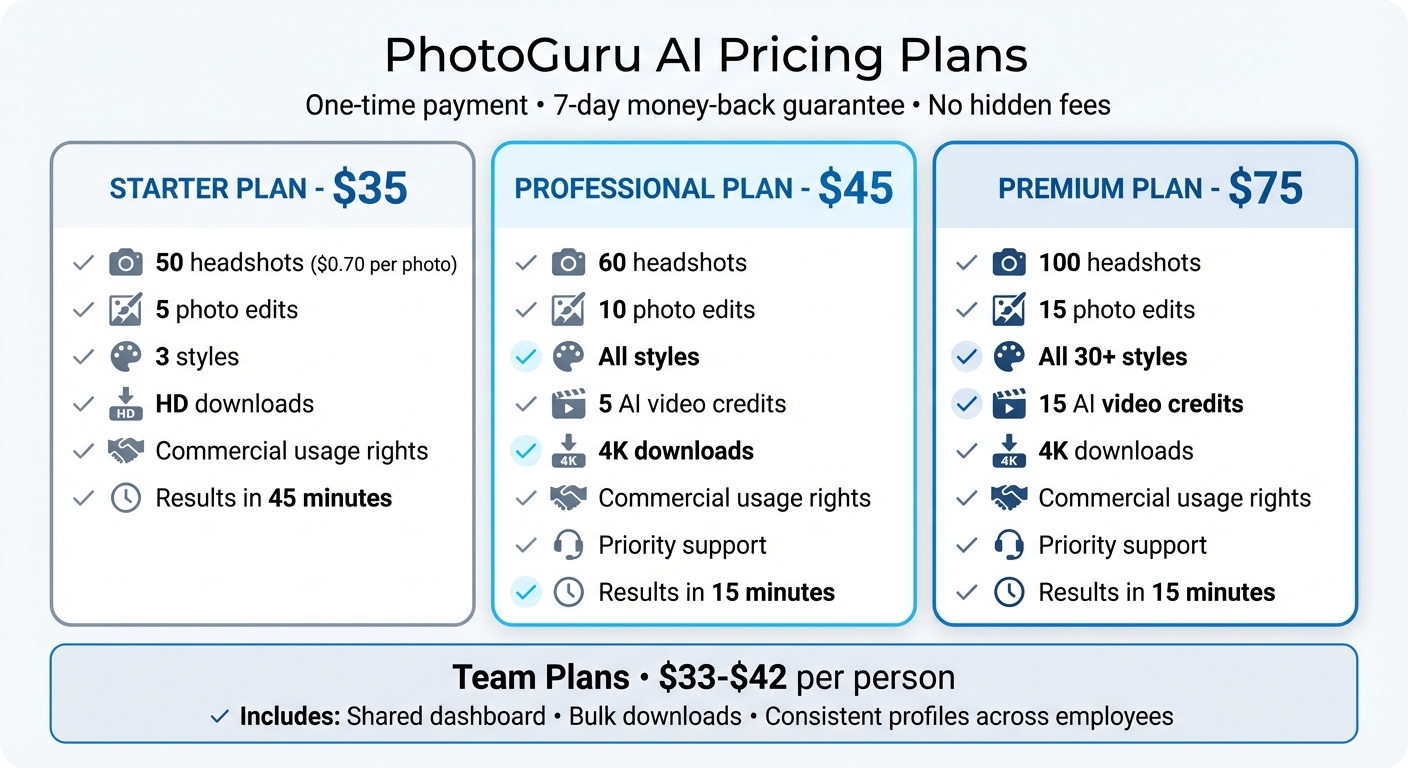
PhotoGuru AI Pricing Plans Comparison: Features and Costs
PhotoGuru AI transforms your clear selfies into polished, studio-quality headshots in over 30 professional styles. The platform uses advanced facial recognition to retain your distinct features, no matter which style you choose. This means you can create consistent, high-quality headshots for LinkedIn, Instagram, and business profiles - all without the hassle of scheduling multiple photo sessions.
3-Step Process for Quick Results
PhotoGuru AI makes the process fast and straightforward. Start by uploading a clear, front-facing selfie. Then, pick from a variety of styles like "CEO Material", "Elite Status", or "Urban Cool." Finally, generate and download your headshots in just minutes. The Starter plan delivers results in 45 minutes, while the Premium plan speeds things up to just 15 minutes. Compare that to traditional photo sessions, which can take over 15 hours, plus waiting time. This streamlined process also leaves room for further tweaks to ensure your images perfectly reflect your personal or professional brand.
Features That Support Visual Consistency
PhotoGuru AI doesn’t just stop at creating headshots - it also offers tools to fine-tune your images. You can adjust lighting and backgrounds to ensure every photo aligns with your brand’s look and feel. Plus, all plans include commercial usage rights, so you can confidently use your photos across LinkedIn, social media, websites, and marketing materials.
For those looking to go beyond photos, the Professional and Premium plans include AI video credits - 5 and 15, respectively - allowing you to create dynamic profile content. These plans also come with priority support. Whether you’re downloading in HD with the Starter plan or in 4K with the higher tiers, every image is sharp and high-quality, whether it’s a small profile picture or a large banner.
Pricing Plans for Individuals and Teams
PhotoGuru AI offers a simple, one-time payment model, so you don’t have to worry about ongoing subscriptions. Here’s a breakdown of the individual plans:
- Starter Plan: $35 for 50 headshots, 5 photo edits, access to 3 styles, HD downloads, and commercial usage rights. That’s about $0.70 per photo.
- Professional Plan: $45 for 60 headshots, 10 photo edits, access to all styles, 5 AI video credits, 4K downloads, commercial usage rights, and priority support.
- Premium Plan: $75 for 100 headshots, 15 photo edits, access to all 30+ styles, 15 AI video credits, 4K downloads, and priority support.
For teams, plans range from $33 to $42 per person and include features like a shared dashboard and bulk downloads, ensuring consistent profiles across employees. All plans come with a 7-day money-back guarantee and no hidden fees, making it easy to maintain a professional, cohesive visual identity.
sbb-itb-5a0f94b
Tips for Creating Consistent Photos with AI Tools
How to Prepare Your Input Photos
Start with well-lit, front-facing selfies that are at least 1,024×1,024 pixels in resolution. Avoid harsh backlighting and heavy filters, as they can distort the image quality and affect the results. Ideally, use soft, even lighting from natural sources, such as standing near a window, or a diffused ring light. Steer clear of overhead lights or strong backlighting, which can create unflattering shadows.
Make sure your face is fully visible and directly facing the camera. Skip accessories like sunglasses or hats, and avoid applying heavy filters. These adjustments help the AI accurately capture your facial features, ensuring your identity is consistent across different styles. For the background, opt for something simple and uncluttered, like a plain wall or a solid color. This reduces distractions and makes it easier for AI tools to cleanly edit or replace the background.
Upload 10–20 clear selfies with slight variations in angles (e.g., a small turn to the left or right) and subtle expression changes (like a neutral face or a soft smile). Keep your hairstyle consistent across all photos to maintain continuity.
Once your input photos are ready, use them as the foundation for creating a cohesive personal brand.
Creating a Personal Brand Kit
Start by defining a primary "hero" look - this includes a consistent background (like a blurred office or a light gray gradient) and a go-to outfit. Ensure your color scheme aligns with your or your company's branding, as many AI tools can adjust background tones to match your brand palette.
Document four key elements on a single reference sheet:
- Background (e.g., soft light-gray gradient)
- Outfit style (e.g., navy blazer with a light shirt)
- Color palette (two main colors and one neutral shade)
- Framing rules (e.g., head-and-shoulders framing with eyes positioned in the upper third of the image).
Save these decisions and use them as presets or prompts when generating new images with tools like PhotoGuru AI. For social media, where a slightly more casual look is fine, stick to the same pose, cropping, and core color scheme, but feel free to experiment with subtle background variations or stylistic details.
Once your brand kit is in place, focus on keeping your visuals up-to-date while staying true to your established style.
Keeping Your Photos Consistent Over Time
To maintain a polished and consistent look, update your visuals periodically. Plan for an annual refresh or make updates after any significant, lasting changes to your appearance, such as a new hairstyle, permanent glasses, or facial hair. Capture fresh selfies and apply your brand kit elements - background, color palette, framing, and outfit - so your updated images match your established style. Reuse your saved prompts or presets to streamline the process.
For different platforms, adjust your image crop to fit their specific requirements. A square aspect ratio (1:1) works well for LinkedIn and Instagram profiles, while a 4:5 or 3:4 vertical crop often appears more polished on company websites and bios. Update all major profiles within the same week to ensure a unified look across platforms. Be sure to record the exact settings or prompts you used so you can replicate the same style during future updates.
Conclusion
Having consistent profile photos across LinkedIn, email signatures, company directories, and social platforms makes you instantly recognizable. When your face, framing, and visual style - like colors, lighting, and backgrounds - are aligned, it creates a lasting impression. This consistency not only helps people remember you but also conveys professionalism and trust, reinforcing your personal brand. And thanks to modern AI tools, achieving this is easier than ever.
AI solutions bring speed, affordability, and reliability that traditional studio sessions often can't match. With just a batch of selfies, you can create polished headshots in minutes. For example, PhotoGuru AI offers plans starting at $35 for 50 headshots, giving you a library of professional images that can be updated whenever you change roles, join a new company, or refresh your online presence.
To make the most of these tools, pick one AI platform for key uses like LinkedIn or your website. Define a consistent style - your personal brand standard - and stick to it. Refresh your photos once or twice a year using the same setup to stay current while maintaining a cohesive look. For teams, centralizing profile photo management and agreeing on a shared style transforms what used to be a time-consuming task into a simple, cost-effective process that keeps everyone’s online presence aligned as your team grows.
FAQs
How do AI tools keep my facial features consistent across different styles?
AI tools rely on sophisticated algorithms to identify and retain essential facial features like the eyes, nose, and mouth. This ensures that your distinct characteristics remain recognizable, regardless of how the style is altered. As a result, the images maintain your identity, making them versatile for both professional and personal purposes.
What should a personal brand kit include for consistent profile photos?
A strong personal brand kit for profile photos hinges on three key elements: clarity, consistency, and professionalism. Start with high-quality images that showcase your personal style while being versatile enough for platforms like LinkedIn, social media, and business websites.
Choose a mix of styles that align with your brand but still maintain a polished and unified appearance. This flexibility helps your photos connect with various audiences while staying authentic to who you are. Keeping your visuals consistent across platforms strengthens recognition and builds trust in your personal brand.
How often should I refresh my profile photos to keep a consistent online presence?
Keeping your profile photos updated every 6 to 12 months is a smart way to maintain a consistent and polished online presence. Regular updates ensure your images reflect any changes in your appearance or style, keeping them current and relevant.
Refreshing your photos also helps reinforce your personal or professional branding across platforms. This makes it easier for others to recognize and engage with you, whether they’re connecting on social media, professional networks, or other online spaces.